Removed records
What it does
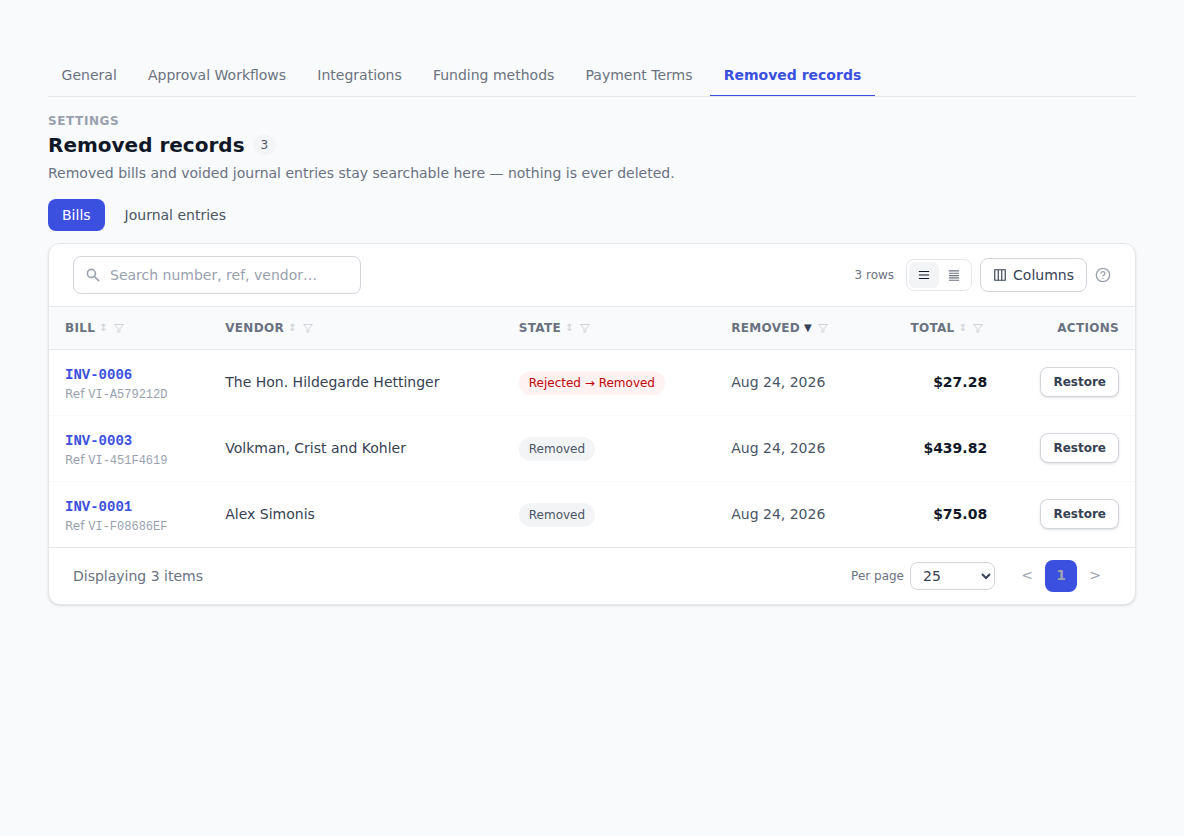
Removing something in BotDoPay doesn't destroy it. Removed bills and voided journal entries go here, where you can look at them and put them back if you removed one by mistake.
How to use it
Find something you removed
- Click Settings in the sidebar, then the Removed records tab.
- Use the two sub-tabs to switch between Bills and Journal entries.
- Search the bills list by number, reference or vendor; search the journal list by entry number or memo.
Restore a bill
Find the bill and click Restore on its row. You'll see Bill restored. and it's back in your normal bills list, exactly as it was.
Voided journal entries
Voided entries appear here as pairs — the original entry and the reversing entry that cancelled it. Both stay on the record permanently, which is what keeps your books honest. You can see the pair back in the general journal by clicking Include voided there. See General journal.
Troubleshooting & Help
- The screen says nothing has been removed. Nothing has been. Removed bills and voided journal-entry pairs land here as they happen.
- The bill you're looking for isn't here. Check the other sub-tab, and clear the search box. Bills that were never removed are on the normal Bills list.
- You can't restore a journal entry. Voided entries aren't restored — the void is a permanent part of the record. Post a fresh entry for what you actually meant.
- You can't see the Removed records tab. It's limited to people who can read bills or journal entries. Ask an admin at your company.