Chart of accounts
What it does
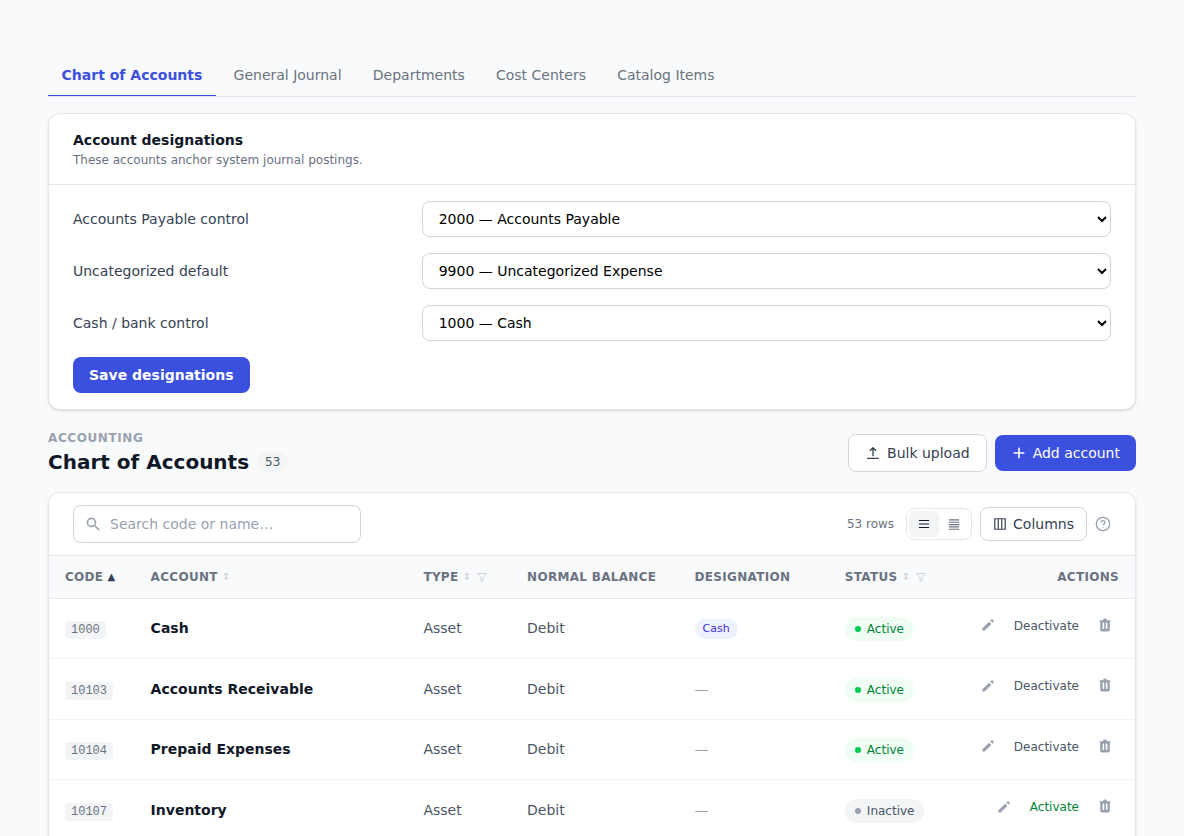
Your chart of accounts is the list of buckets your money is sorted into — cash, accounts payable, cost of goods sold, rent, and so on. Every bill line and journal line points at one of them, which is what makes your reports add up.
How to use it
Add an account
- Click Accounting in the sidebar, then the Chart of Accounts tab.
- Click Add account.
- Fill in Code — the number you sort by, like
1000. - Fill in Name — what people call it, like Operating Cash.
- Pick an Account type — Asset, Liability, Equity, Revenue or Expense. The normal balance fills in for you.
- Click Create account.
The list stays sorted by code, smallest first.
Edit, pause or bring back an account
- Click the edit icon on a row, change what you need, and click Save account.
- Click Deactivate to stop an account being offered on new documents. It stays on everything it's already used on.
- Click Activate to bring it back.
Find an account
Type in the search box above the list. It matches on both the code and the name, so 1000 and
Payable both work.
Tell BotDoPay which accounts are special
A few accounts do a particular job — the one your bank balance lives in, for instance. Set these in the designations card on the same page:
- Find the designations card.
- Pick the account for each slot — for example Cash / bank control.
- Click Save designations.
Setting these matters: payments post their bookkeeping entries against them, so it's worth doing before you send your first payment.
Add a lot of accounts at once
Use the bulk upload on the accounts screen to bring in a spreadsheet. See Importing your data.
Troubleshooting & Help
- "Code has already been taken." Another account is using that number. Pick a different one, or edit the existing account instead.
- An account isn't offered on a bill or purchase order. It's probably deactivated. Open the Chart of Accounts and click Activate on its row.
- A payment didn't post to your books. Check the designations card — if the cash slot is empty, fill it in and the payment will post next time it runs.
- You can't see the Chart of Accounts tab. Not everyone has access to the accounting screens. Ask an admin at your company.